Trial and Pro
XpressPurge works free without an account. Pro unlocks feed modes beyond one, advanced actions, Smart Feed, analytics, sync, Pack Studio, and AI Coach.
Free Plan
Free includes:
- unlimited Hide rules and values;
- 1 feed mode;
- sticky (“Always apply”) exact rules;
- all 17 built-in topic kits, free and unlimited — imported/shared packs are free to import and activate too;
- analytics for today + the last 7 days;
- all Cleanup features;
- the receipt strip option;
- the toolbar popup;
- import/export and diagnostics.
Pro Plans
- Pro Monthly — $7.99/month
- Pro Yearly — $49/year (~$4.08/month)
- Lifetime — $99 one-time (launch pricing)
Pro includes everything in Free, plus:
- unlimited feed modes;
- Boost, Snooze, and Show-only rules;
- high-engagement (viral) filtering;
- Smart Rules and full Smart Feed / Feed Profile;
- full analytics dashboard (14d and 30d ranges) and recent hidden log;
- browser sync (rules + feed mode metadata);
- popup layout customization;
- Pack Studio authoring (create, edit, delete custom packs) and pack export/sharing;
- AI Coach (requires a live license session on this browser);
- multi-device activation within plan limits, plus Restore this browser.
How to Upgrade
- Click Keep Pro, View plans, or any Pro upgrade prompt in the extension.
- Choose a plan on the XpressPurge website.
- Complete checkout through Creem.
- Claim the purchase with the magic link emailed to your checkout address.
- Generate a one-time activation code. On Chromium, click Activate in Extension on that page — Options opens with the code already filled in; confirm with one click. Otherwise copy the code.
- In the extension: Options → Account → paste the code under Activate, or complete Restore (email + OTP).
There is no password account. Pro is tied to the checkout email and bound per browser.
After activation, the extension stores a local entitlement token and refresh token for this browser.
Refresh License
Use Refresh license in Options → Account if:
- your plan changed;
- the extension still shows Free after activation;
- your token expired;
- support asks you to refresh.
Device Limits
| Plan | Devices (default) |
|---|---|
| Subscription | 3 |
| Lifetime | 5 |
Options → Account can list devices. At the cap, revoke an older device, then activate or restore again. Revoking a device signs that browser out of Pro.
Clear Local License
Clear local license removes Pro data from this browser only. It does not cancel your subscription. Use Restore or a new activation code to re-link.
Restore This Browser
If you reinstalled the extension or got a new browser, use Restore this browser with the same email as checkout — you do not need to buy again. Details: Account, Pro, and Billing.
Trial
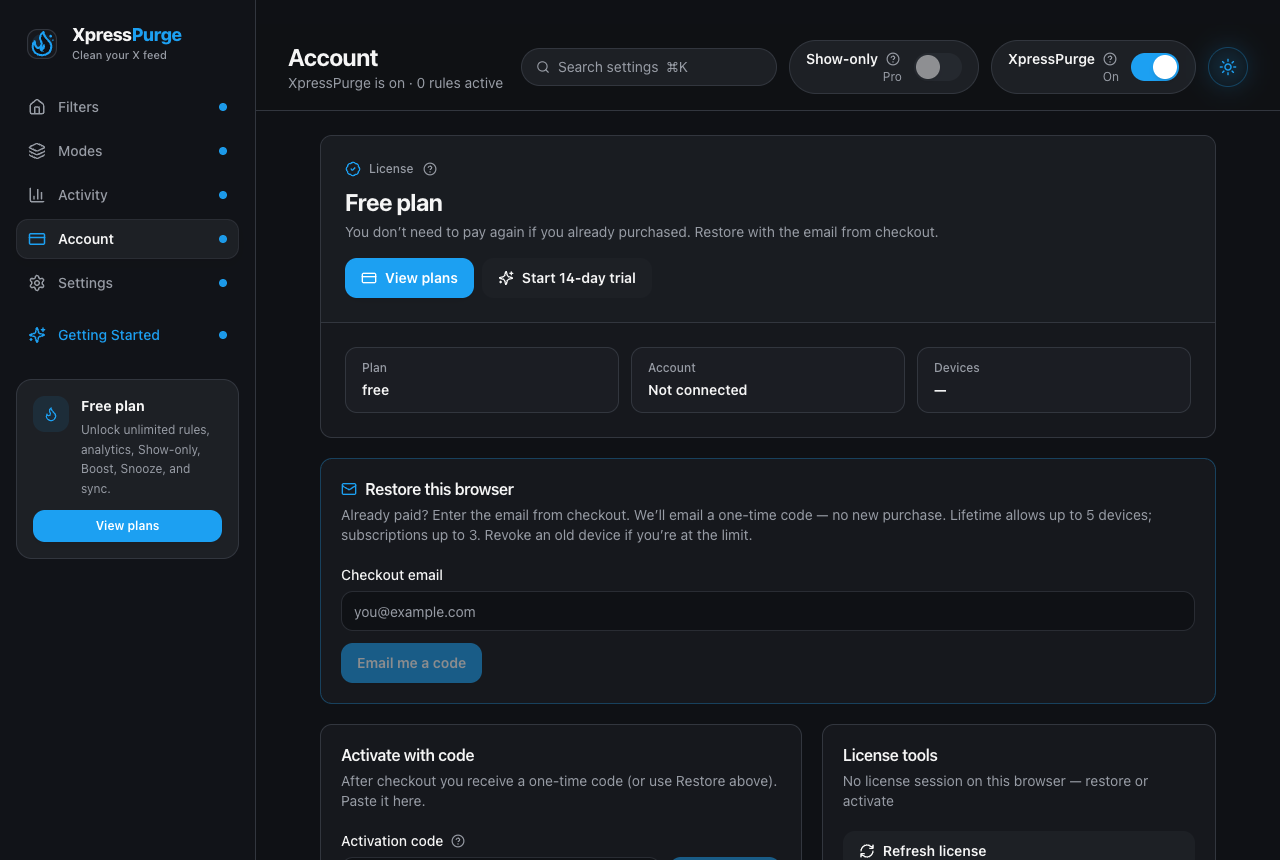
Options → Account on the Free plan: trial start, restore, and activation
New installs can take a 14-day Pro trial — no card, one-shot per install (on builds that ship the Smart Feed model). Nothing starts automatically: the trial begins only when you explicitly click Start trial on the onboarding Done step (a proper trial card with the feature list) or the Start 14-day trial button in Options → Account.
During the trial everything Pro works — Smart Feed, advanced actions, multi modes — and AI Coach is included with 15 actions (server-enforced). When the AI actions run out, or the trial expires, you get clean quota/upgrade messaging.
You don't have to wait for day 14: the popup and Options show the days remaining and a Keep Pro button throughout the trial. In the last 3 days the toolbar badge shows the days left (3d, 2d, then !) so the deadline doesn't sneak up on you. Buying mid-trial simply keeps everything running — the trial clock is never reset by upgrades or updates.
When the trial ends:
- your rules, topic kits, and Cleanup keep filtering exactly as before;
- the Smart Feed pauses (its understanding layer is Pro); your Smart topics stay saved and resume the moment you upgrade;
- Modes shows a one-click Resume with Pro button;
- a one-time note lets you know — no repeated banners.
Missed the trial card? The manual fallback is Options → Account → Start 14-day trial. The trial is one-shot per install. Pro is activated with a code or Restore after checkout.
DEV builds (developers only)
DEV_PRO paints Pro UI for local development but does not create a real license JWT. AI Coach will still require Activate or Restore against a test API. End users never see this path.