Feed Profile / Smart Topics
Your Feed Profile (Smart topics on the active feed mode) tells XpressPurge what you care about and what you would rather see less of. It is used by the lexical engine (topic kits and heuristics) and by the optional Smart Feed (semantic tier) to protect interests and rank noise.
On a fresh install, the welcome setup asks "What are you sick of seeing?" and seeds this profile for you: phrases you type in your own words become Smart topics, matching topic kits switch on automatically (all built-in kits are free and unlimited), and anything left over becomes a keyword rule. On builds that ship the Smart Feed model, the setup's Done step also offers a one-shot 14-day Pro trial — it starts only if you click Start trial; nothing starts automatically. When the trial ends, your kits and rules keep filtering.
For switching whole setups (kits + rules + topics + strictness), see Feed Modes.
Where to Edit It
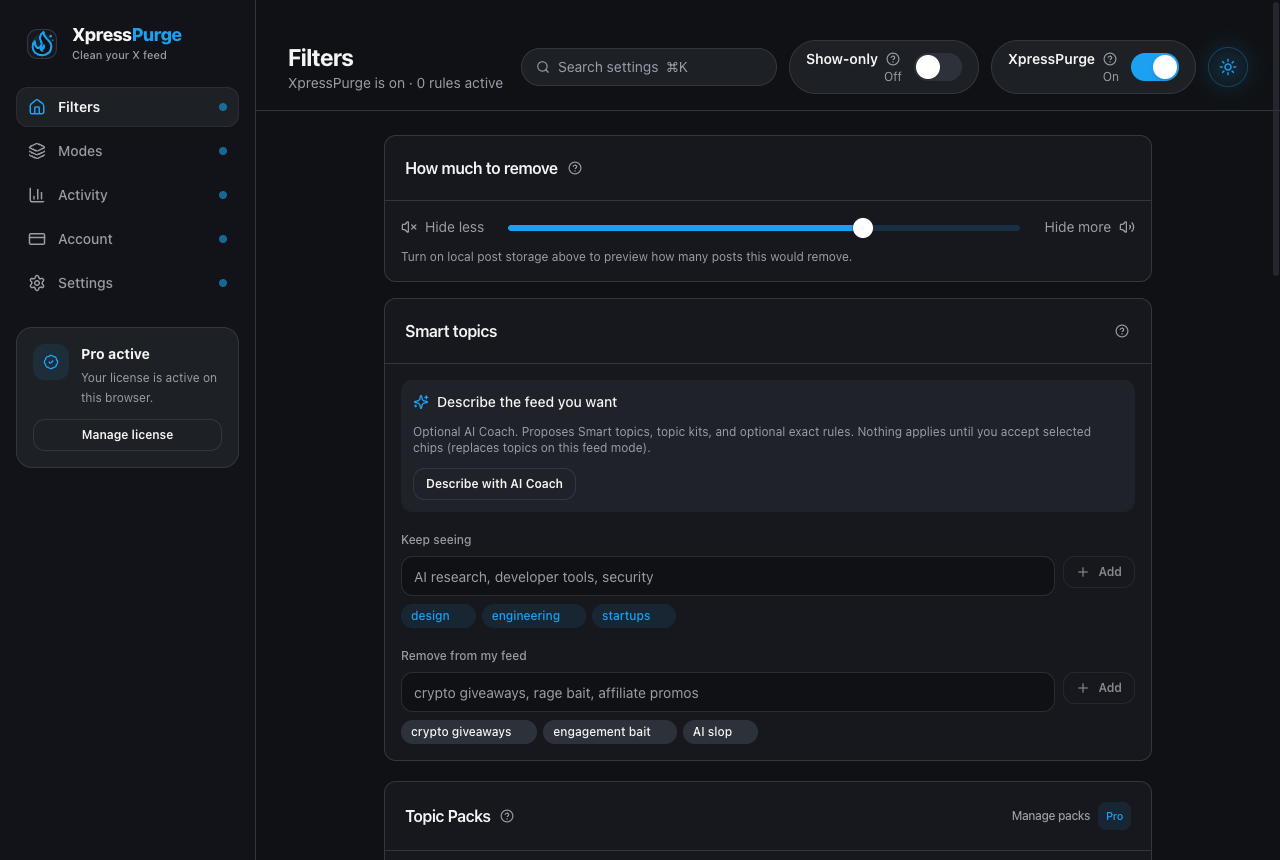
Smart topics on Options → Filters: keep seeing vs remove from my feed
Smart topics are edited on Options → Filters, in the Smart topics card (Keep seeing / See less editors and learned examples). The strictness dial also lives on Filters. The feed mode switcher, engine tier, Smart Feed requirements, and Learn from what I hide live on Options → Modes. Recently removed and Export corpus live on Options → Activity. Local post storage consent (Store recent posts on this device) lives in Settings → Local data so corpus opt-in is clear.
Tip: press ⌘K (or /) in the Options header to search settings, or use deep links such as options.html#filters and options.html#modes.
Keep Seeing
Add topics, names, and phrases you want to protect. Examples:
AI research, developer tools, startups, security
Adding related names helps. For example, if you like AI content, add "AI, Claude, ChatGPT, Anthropic" so related names are also protected when they appear nearby in posts.
See Less Of
Add topics and phrases you want treated as cleanup signals. Examples:
crypto giveaways, rage bait, affiliate promos, follow for follow
How It Protects You
The Feed Profile protects interests in two ways:
- Direct match protection: if a repeated phrase literally contains one of your Keep seeing terms, it is protected from filtering.
- Co-occurrence protection: if a phrase repeatedly appears in posts that also contain your Keep seeing terms, it is protected even when the phrase itself does not match your interests.
Learn From What I Hide
Pro users can opt in to Learn from what I hide. When enabled:
- the flame menu on each post gains See less like this, which turns that post into an example the Smart Feed compares future posts against;
- correcting a hide with Not <topic> turns that post into a protective example instead;
- posts you reveal with Not <topic> are also stored as soft labels;
- everything stays local and is never sent to the XpressPurge backend.
An example is more useful than it sounds. A typed phrase like "AI" can sit a long way from a model release note that only talks about weights and version numbers. The post's own meaning has no such gap, so the next post of that kind is close to it. One example can cover a category you could not have described in words.
Every example is listed in the Smart topics card with the post it came from, and can be deleted individually. Examples also keep score: recovering a hidden post counts against whatever example hid it, and an example you overturn at least half the time, over four or more hides, is retired automatically.
Smart Feed (Semantic Tier)
For Pro users, the optional Smart Feed embeds post text locally and compares it to your interests and dislikes. A post is removed when it is close enough in meaning to one of your dislikes and clearly closer to that dislike than to anything you listed as an interest. A post that matches both is kept — that margin is deliberate, because a post sitting between two things you care about in opposite directions is the worst possible thing to delete silently.
A close-but-not-close-enough match is not thrown away. It becomes ordinary evidence that can combine with topic packs and heuristics, but it can never hide a post on its own.
Typed phrases and learned examples are judged against different similarity thresholds. A short phrase and a full post are not written the same way, so a phrase never looks as similar to a post as another post does; using one number for both would make the phrases too lax or the examples too strict.
The Smart Feed only runs when every requirement in the requirements panel is met:
- you are on Pro;
- your build includes the on-device model;
- filtering mode is set to Smart Feed;
- you have at least one interest or dislike;
- Store recent posts on this device is on (Settings → Local data). This is required, and it is requested once with an explicit disclosure. Learning from a post means keeping that post's text. Nothing is uploaded and nothing is synced.
Learn from what I hide is listed as recommended rather than required.
The status indicator at the top of the Filtering card (Options → Modes) reads Smart Feed active only when all of the required items are met; while anything is missing, the requirements list stays expanded so you can see exactly what to turn on. Once everything is set, it collapses to a one-line summary. On Firefox, or when no model is configured, the Smart Feed is unavailable and the engine falls back to topic packs and rules.
Export Corpus
When posts are stored locally, the Activity card (Options → Activity) offers Export corpus. This writes a JSON file containing your stored posts, their vectors, your typed phrase vectors, your labels, and your learned examples, for use with the npm run calibrate threshold-tuning script. It is a development tool.
The file does contain post text, so treat it as private. Nothing is uploaded: the export happens only when you ask for it, and the file goes wherever your browser saves downloads.
Privacy
Smart topics and mode metadata are stored locally. They are not sent to the XpressPurge backend for filtering. If browser sync is enabled (Pro), rules and feed-mode metadata (including interest/dislike text lists) can sync — not embeddings, learned examples, labels, or stored posts.