Options, Privacy, Sync, and Import/Export
The full XpressPurge dashboard is Options.
Open it from:
- the toolbar popup;
- the in-page post menu;
- the browser extension details page;
chrome://extensions(or equivalent).
Sidebar Pages
Options is organized by user intent (schema 20). The tabs are:
| Tab | Purpose |
|---|---|
| Filters | Exact rules, topic kits, Pack Studio, Smart topics / Smart Feed, the removal strictness dial |
| Modes | Feed modes, engine tier, Learn from what I hide |
| Activity | Hidden log (Recently removed) and analytics / insights (Pro full dashboard) |
| Account | Activate, Restore, devices, plan |
| Settings | Theme, hide behavior, filter suggestions, local data, surfaces, popup layout, privacy/telemetry, sync, import/export, diagnostics |
The old Data tab is retired: the corpus consent "Store recent posts on this device" now lives at Settings → Local data.
Settings Search (⌘K)
Press ⌘K (Ctrl+K on Windows/Linux) anywhere in Options to search every setting by intent — for example "strictness", "sync", or "stored posts". Choosing a result jumps to the right tab and highlights the setting.
Header Controls
Typical header chrome includes whether filtering is on, active rule counts, Show-only (when allowed), and the master switch. The sidebar plan card shows View plans (Free) or Manage license (Pro).
Settings Highlights
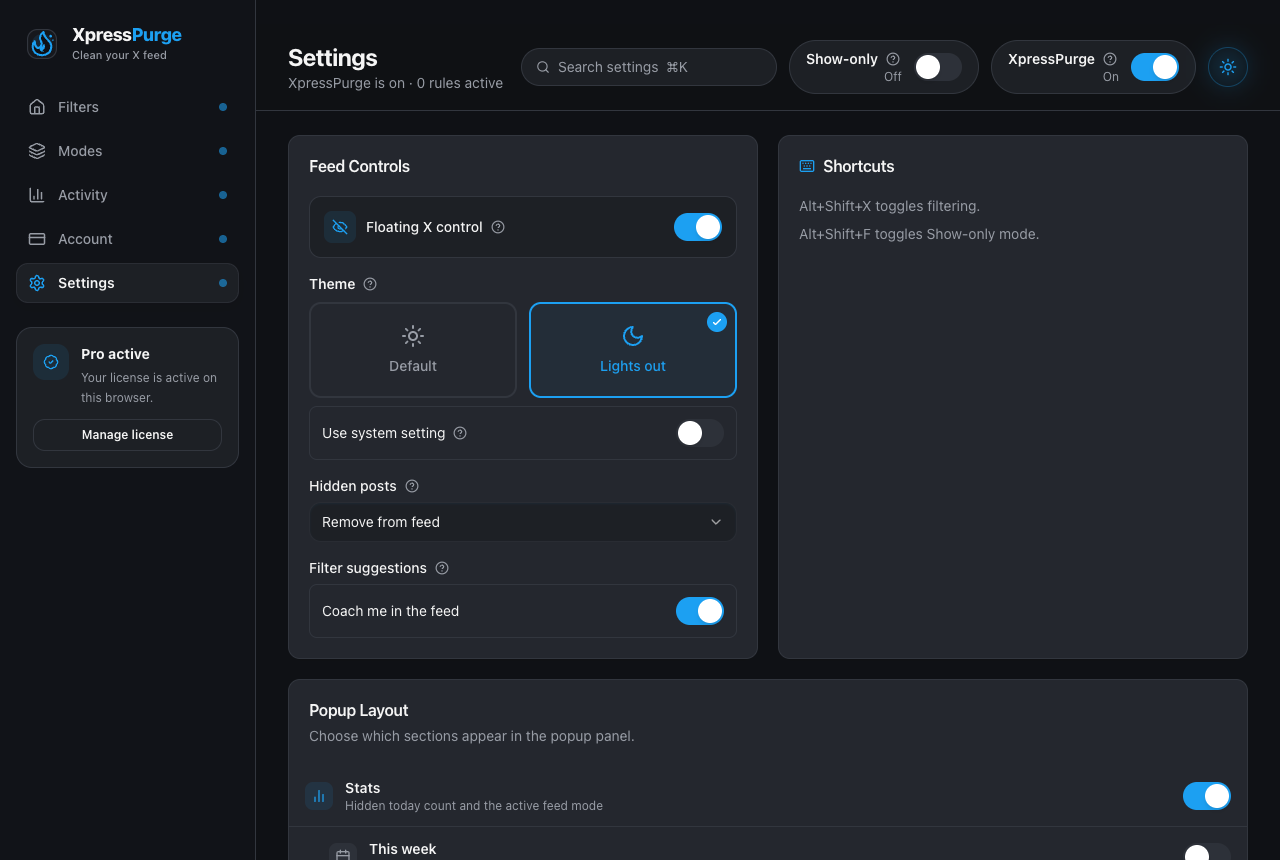
Options → Settings: feed controls, theme, hidden-post behavior, popup layout
Theme
Default/Light, Lights out/Dark, or System.
Hidden Posts
- Remove from feed
- Leave a one-line receipt
No dimming option.
Filter Suggestions (Coach)
Occasional one-tap suggestions in your feed — a standing rule for an author you keep hiding, a topic that is over-hiding. Computed only from what happens on this device and never applied without your tap. On by default; toggle at Settings → Filter suggestions. See AI Coach.
Local Data
Store recent posts on this device — the opt-in corpus consent for Smart Rules and Smart Feed learning (formerly on the retired Data tab). Clearing stored posts is controlled here too.
Shortcuts
- Alt+Shift+X — toggle filtering
- Alt+Shift+F — toggle Show-only mode
Popup Layout (Pro)
Optional sections: stats, weekly stats, Show-only, hide behavior, theme, quick access, footer links. (Legacy “active presets” layout flags are ignored.)
Privacy / Telemetry
- Keep data local by default
- Allow diagnostics export
- Share anonymous product telemetry
Telemetry uses a random install ID separate from the Pro billing device ID. It does not include post text, rule values, feed history, hidden previews, email, activation codes, or refresh tokens.
Download Export JSON
Backup of local configuration: settings (including feed modes), rules, and related non-sensitive config. Does not include paid entitlement/billing secrets, feed history, hidden-log previews, or analytics events. Older exports that contained presets are still importable and folded into feed modes where possible.
Import JSON
Replaces local configuration. Cannot grant Pro access.
Diagnostics
Optional export for support: version, browser, counts (rules, modes, analytics days, hidden-log entries), settings summary, entitlement summary, sync status, selector health. Does not include post text or rule values.
Browser Sync (Pro)
When enabled, XpressPurge uses the browser’s built-in sync storage for:
- rules;
- feed mode metadata (
feedProfilesand mirrored feed-profile consent/topics); - filtering enabled, hide behavior, Show-only mode;
- update timestamp.
Sync uses your browser account (e.g. Google or Firefox), not an XpressPurge password.
Never synced: feed history, hidden-log previews, analytics, embeddings, learned anchors, pack corrections, AI tokens.
Sync Now / Disable / Clear Sync Data
Push current config, stop syncing (local rules remain), or clear the remote sync backup without deleting local rules.
Smart Rules History
Local post capture for Smart Rules and Smart Feed learning is controlled by Store recent posts on this device (Settings → Local data), not a separate consent on a legacy Smart or Data tab. See Smart Rules and Feed Profile.