Exact Rules
Exact rules tell XpressPurge what to match and what action to take. Manage them on Options → Filters → Exact rules.
Rule Structure
Each rule has:
- Rule type — what is checked
- Action — Hide, Boost, Snooze, or Show-only
- Values — keywords, handles, domains, media chips, or engagement number
- Always apply (sticky) — when on, the rule runs on every feed mode
- Enabled state
- Source metadata — manual, flame menu, Smart Rules, starter, etc.
Rules no longer belong to presets. Mode membership is handled by the active feed mode (and sticky flag). See Feed Modes.
Rule Types
Keyword
Matches posts containing any listed chip (OR). Example: crypto, ai slop, politics.
Account
Matches author handles (normalized with @).
Post Contains
Image, video, quote, and/or external link.
Engagement
Combined visible replies + reposts + likes (and related signals where available).
- At most — quiet posts (historical default)
- At least — viral / high-engagement posts (Pro practical for ragebait farming)
X can change how metrics appear; treat engagement rules as helpful, not perfect.
Link Domain
External domains, normalized (no scheme/www/path).
Advanced Logic
The engine supports conditions with and / or. The builder usually creates one type per rule; multi-condition UI may be limited. “Or” inside a type is multiple chips. Regex is separate — see Regex and Pattern Matching.
Actions
| Action | Plan | Effect |
|---|---|---|
| Hide | Free | Remove or receipt per hide style |
| Boost | Pro | Highlight matching posts |
| Snooze | Pro | Temporarily hide; auto-expires |
| Show-only | Pro | Keep matches when Show-only mode is on |
Verdicts always beat soft signals from kits or Smart Feed.
Sticky vs Mode-Scoped
- Always apply on → every feed mode
- Always apply off → current mode (and modes that include the rule). Single-mode installs with an empty rule list still run all non-sticky rules.
Create / Edit / Delete
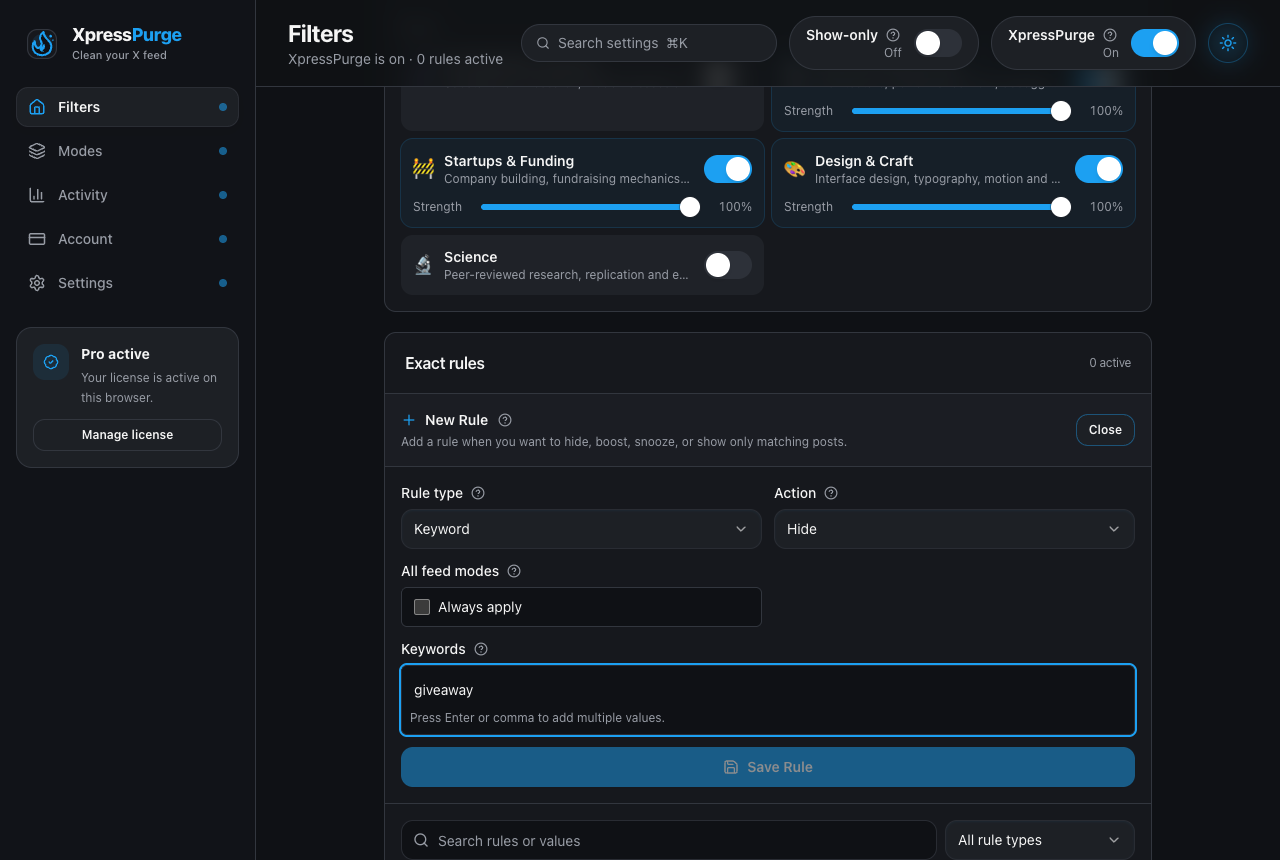
Creating a keyword rule: type, action, and Always apply
- Options → Filters → Exact rules
- Create rule or expand a row to edit
- Save; toggle enabled in the list or from the popup Rules subview
Deleting a rule removes it from all modes.
Free Limits
- Unlimited Hide rules and values
- Boost / Snooze / Show-only and viral engagement direction require Pro